> ## Documentation Index
> Fetch the complete documentation index at: https://docs.viscribe.ai/llms.txt
> Use this file to discover all available pages before exploring further.
# Extract structured data
> Extract schema-shaped data from images using simple fields, JSON Schema, or Pydantic models in Python.
 ## Overview
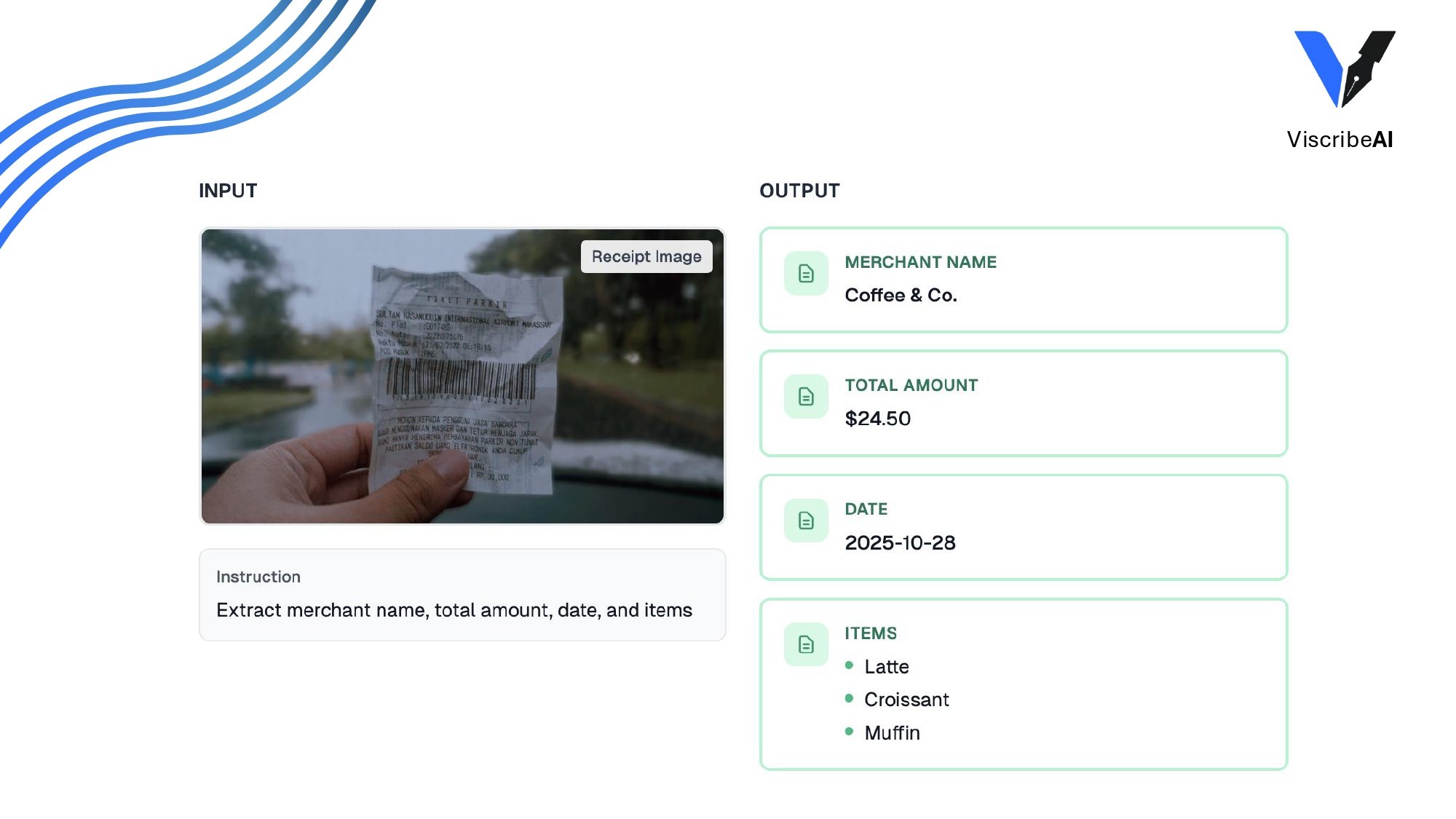
`extract` turns an image into structured data. You provide an `output_schema`
and an optional instruction, and ViscribeAI asks the model for strict JSON that
matches that schema.
Use simple fields for quick extraction. Use JSON Schema, or a Pydantic model in
Python, when your application needs richer types or nested objects. In
TypeScript, you can also pass a Zod schema directly.
## Pydantic models
Python can accept a Pydantic model class as `output_schema`.
```python theme={null}
from pydantic import BaseModel, Field
from viscribe.images import extract
class Receipt(BaseModel):
merchant_name: str | None = Field(description="Store or business name")
total_amount: float | None = Field(description="Final total on the receipt")
date: str | None = Field(description="Receipt date if visible")
line_items: list[str] = Field(description="Visible purchased items")
result = extract(
image_path="examples/receipt.png",
output_schema=Receipt,
instruction="Extract the receipt fields visible in the image.",
model_config={"model": "gpt-5-mini"},
)
print(result.data.model_dump())
```
## Simple fields
Simple fields support `text`, `number`, `array_text`, and `array_number`.
ViscribeAI converts them into a strict object schema. A maximum of 10 fields is
supported.
```python theme={null}
result = extract(
image_path="examples/receipt.png",
output_schema=[
{"name": "merchant_name", "type": "text"},
{"name": "total_amount", "type": "number"},
{"name": "line_items", "type": "array_text"},
],
instruction="Extract the receipt fields visible in the image.",
model_config={"model": "gpt-5-mini"},
)
```
```ts theme={null}
import { images, type ExtractField } from "viscribe";
const fields: ExtractField[] = [
{ name: "merchant_name", type: "text" },
{ name: "total_amount", type: "number" },
{ name: "line_items", type: "array_text" },
];
const result = await images.extract({
imagePath: "examples/receipt.png",
outputSchema: fields,
instruction: "Extract the receipt fields visible in the image.",
modelConfig: { model: "gpt-5-mini" },
});
```
## JSON Schema
Use JSON Schema when you need explicit schema control.
```python theme={null}
result = extract(
image_path="examples/receipt.png",
output_schema={
"title": "Receipt",
"type": "object",
"properties": {
"merchant_name": {"type": ["string", "null"]},
"total_amount": {"type": ["number", "null"]},
"line_items": {
"type": "array",
"items": {"type": "string"},
},
},
"required": ["merchant_name", "total_amount", "line_items"],
"additionalProperties": False,
},
model_config={"model": "gpt-5-mini"},
)
```
```ts theme={null}
const result = await images.extract({
imagePath: "examples/receipt.png",
outputSchema: {
title: "Receipt",
type: "object",
properties: {
merchant_name: { type: ["string", "null"] },
total_amount: { type: ["number", "null"] },
line_items: {
type: "array",
items: { type: "string" },
},
},
required: ["merchant_name", "total_amount", "line_items"],
additionalProperties: false,
},
modelConfig: { model: "gpt-5-mini" },
});
```
## Zod schemas
TypeScript can accept Zod schemas as `outputSchema`. ViscribeAI converts the
schema to JSON Schema for the model request, then validates the parsed response
with Zod before returning `result.data`.
```ts theme={null}
import { z } from "zod/v4";
import { images } from "viscribe";
const Receipt = z.object({
merchant_name: z.string().nullish(),
total_amount: z.number().nullish(),
line_items: z.array(z.string()),
});
const result = await images.extract({
imagePath: "examples/receipt.png",
outputSchema: Receipt,
instruction: "Extract the receipt fields visible in the image.",
modelConfig: { model: "gpt-5-mini" },
});
console.log(result.data.total_amount);
```
## Result and validation
`result.data` contains the parsed object. Python returns a Pydantic instance when
the output schema is a Pydantic model; otherwise it returns a dictionary.
TypeScript returns the parsed object, or Zod-parsed data when the output schema
is a Zod schema.
With strict mode enabled, ViscribeAI asks the provider for strict structured
output and fills required properties for object schemas. Strict mode is enabled
by default.
Strict schemas are checked against the OpenAI Structured Outputs subset before
the request is sent. Unsupported schemas raise `StructuredOutputSchemaError`
with a schema path and suggested fix.
ViscribeAI also validates parsed model output locally before returning
`result.data`. Invalid output raises `StructuredOutputValidationError`.
Learn how Python and TypeScript validate extracted data against your output schema.
## Overview
`extract` turns an image into structured data. You provide an `output_schema`
and an optional instruction, and ViscribeAI asks the model for strict JSON that
matches that schema.
Use simple fields for quick extraction. Use JSON Schema, or a Pydantic model in
Python, when your application needs richer types or nested objects. In
TypeScript, you can also pass a Zod schema directly.
## Pydantic models
Python can accept a Pydantic model class as `output_schema`.
```python theme={null}
from pydantic import BaseModel, Field
from viscribe.images import extract
class Receipt(BaseModel):
merchant_name: str | None = Field(description="Store or business name")
total_amount: float | None = Field(description="Final total on the receipt")
date: str | None = Field(description="Receipt date if visible")
line_items: list[str] = Field(description="Visible purchased items")
result = extract(
image_path="examples/receipt.png",
output_schema=Receipt,
instruction="Extract the receipt fields visible in the image.",
model_config={"model": "gpt-5-mini"},
)
print(result.data.model_dump())
```
## Simple fields
Simple fields support `text`, `number`, `array_text`, and `array_number`.
ViscribeAI converts them into a strict object schema. A maximum of 10 fields is
supported.
```python theme={null}
result = extract(
image_path="examples/receipt.png",
output_schema=[
{"name": "merchant_name", "type": "text"},
{"name": "total_amount", "type": "number"},
{"name": "line_items", "type": "array_text"},
],
instruction="Extract the receipt fields visible in the image.",
model_config={"model": "gpt-5-mini"},
)
```
```ts theme={null}
import { images, type ExtractField } from "viscribe";
const fields: ExtractField[] = [
{ name: "merchant_name", type: "text" },
{ name: "total_amount", type: "number" },
{ name: "line_items", type: "array_text" },
];
const result = await images.extract({
imagePath: "examples/receipt.png",
outputSchema: fields,
instruction: "Extract the receipt fields visible in the image.",
modelConfig: { model: "gpt-5-mini" },
});
```
## JSON Schema
Use JSON Schema when you need explicit schema control.
```python theme={null}
result = extract(
image_path="examples/receipt.png",
output_schema={
"title": "Receipt",
"type": "object",
"properties": {
"merchant_name": {"type": ["string", "null"]},
"total_amount": {"type": ["number", "null"]},
"line_items": {
"type": "array",
"items": {"type": "string"},
},
},
"required": ["merchant_name", "total_amount", "line_items"],
"additionalProperties": False,
},
model_config={"model": "gpt-5-mini"},
)
```
```ts theme={null}
const result = await images.extract({
imagePath: "examples/receipt.png",
outputSchema: {
title: "Receipt",
type: "object",
properties: {
merchant_name: { type: ["string", "null"] },
total_amount: { type: ["number", "null"] },
line_items: {
type: "array",
items: { type: "string" },
},
},
required: ["merchant_name", "total_amount", "line_items"],
additionalProperties: false,
},
modelConfig: { model: "gpt-5-mini" },
});
```
## Zod schemas
TypeScript can accept Zod schemas as `outputSchema`. ViscribeAI converts the
schema to JSON Schema for the model request, then validates the parsed response
with Zod before returning `result.data`.
```ts theme={null}
import { z } from "zod/v4";
import { images } from "viscribe";
const Receipt = z.object({
merchant_name: z.string().nullish(),
total_amount: z.number().nullish(),
line_items: z.array(z.string()),
});
const result = await images.extract({
imagePath: "examples/receipt.png",
outputSchema: Receipt,
instruction: "Extract the receipt fields visible in the image.",
modelConfig: { model: "gpt-5-mini" },
});
console.log(result.data.total_amount);
```
## Result and validation
`result.data` contains the parsed object. Python returns a Pydantic instance when
the output schema is a Pydantic model; otherwise it returns a dictionary.
TypeScript returns the parsed object, or Zod-parsed data when the output schema
is a Zod schema.
With strict mode enabled, ViscribeAI asks the provider for strict structured
output and fills required properties for object schemas. Strict mode is enabled
by default.
Strict schemas are checked against the OpenAI Structured Outputs subset before
the request is sent. Unsupported schemas raise `StructuredOutputSchemaError`
with a schema path and suggested fix.
ViscribeAI also validates parsed model output locally before returning
`result.data`. Invalid output raises `StructuredOutputValidationError`.
Learn how Python and TypeScript validate extracted data against your output schema.